

The median ERP implementation in Panorama Consulting’s 2026 research took nine months, down from 15.5 months in its 2024 report, according to a compilation of Panorama’s published ERP statistics. That drop matters to Dynamics GP users because the calendar they are working against has hardened. Microsoft will end Dynamics GP support on December 31, 2029, security patches stop on April 30, 2031, and extended support for GP 2016 already ended on July 14, 2026.
So how long does a GP to Business Central migration take? For a small or midsize distributor with a reasonably clean GP database and a defined scope, plan on a project measured in months, with nine as a sensible benchmark rather than a promise. What moves that number up or down has less to do with Business Central than with how much history you bring across, how many people need to change how they work, and how quickly decisions get made.
In this article
- What sets the length of a GP migration
- The five stages of a GP to Business Central migration
- What stretches a GP migration timeline
- Working backward from the GP end-of-support date
- GP to Business Central migration timeline: common questions
What sets the length of a GP migration
The technical move is the predictable part. Microsoft’s cloud migration tooling for Dynamics GP brings across company setup, master records for accounts, customers, vendors and items, transactional data, classes, vendor 1099 information and historical data, provided you are running GP 2015 or later. That covers a lot of ground, and it is far more capable than the spreadsheet-driven conversions GP users heard about a few years ago.
The variables sit around it. A distributor running one warehouse on standard GP modules moves faster than one with third-party add-ons for landed cost, EDI or advanced pricing, because each add-on forces a decision about whether Business Central handles it natively, an extension replaces it, or the process itself changes. Panorama’s research points the same way: the most common reasons projects run past their timeline are organizational, such as governance, resistance to change and process redesign, rather than technical execution.
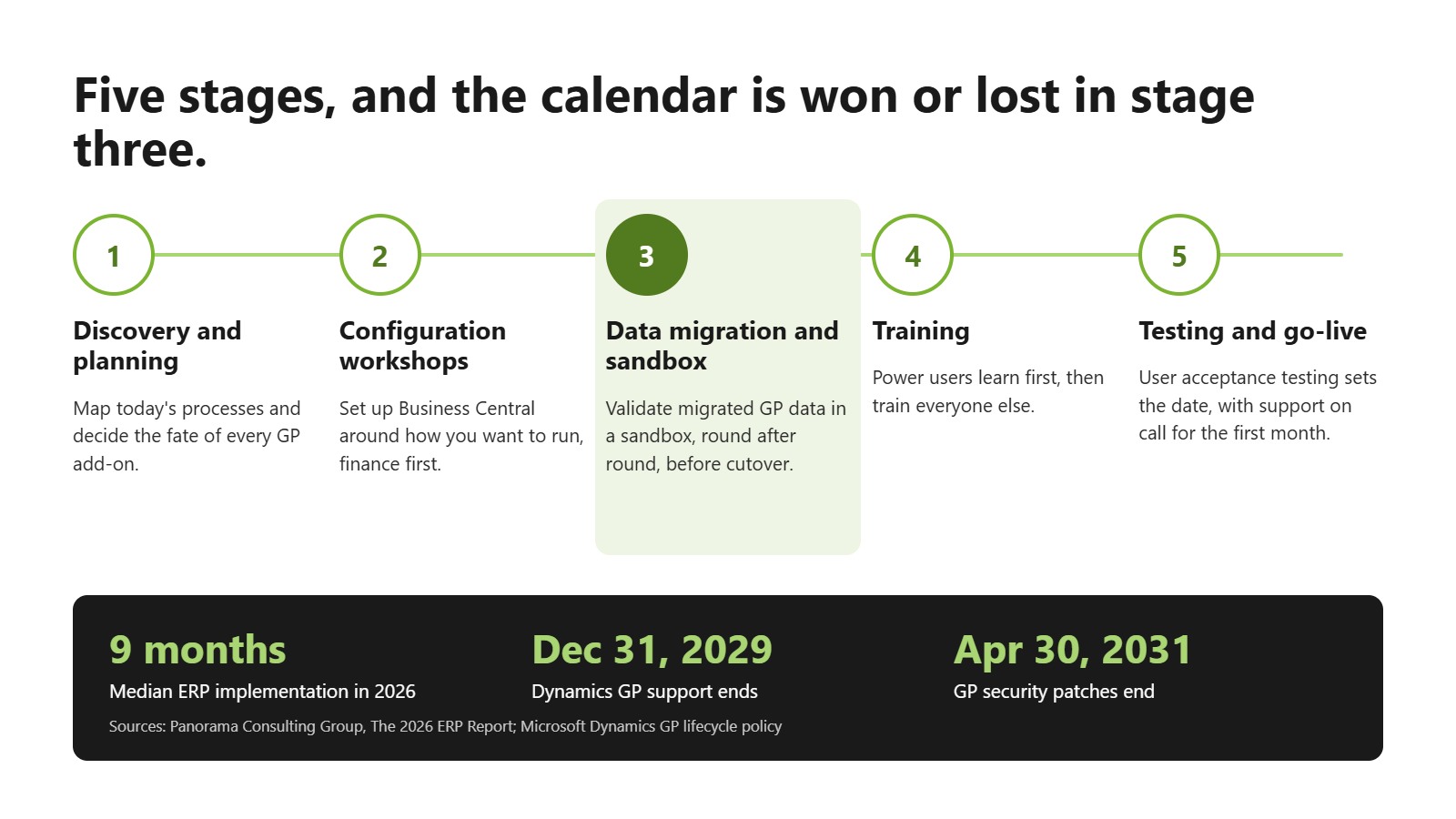
The five stages of a GP to Business Central migration
Well-run migrations move through the same five stages, and the overall timeline is really the sum of how far each one is allowed to drift.
1. Discovery and planning
Discovery workshops establish what the business actually does today, who owns each process and what has to work on day one. For GP customers this is also where the add-on inventory happens, because every ISV product bolted onto GP over the past decade needs an answer before configuration starts. The signs your distribution business has outgrown Dynamics GP tend to surface here too, as teams realize how much of their process lives in Excel.
2. Configuration workshops
Configuration runs as working sessions with the people who own each area, usually finance first, then purchasing, sales and inventory. The goal is a Business Central setup that reflects how you want to operate rather than a copy of how GP forced you to operate. This is the stage where a fixed scope earns its keep, by stopping every preference from turning into a customization.
3. Data migration and sandbox validation
Data moves into a sandbox first, and Microsoft’s own guidance warns against running cloud migration into a production company already in use, because the migration can overwrite data the business depends on. The biggest decision at this stage is how much history to bring. Open balances and master data are not optional; five, ten or twenty years of detailed transactions is a choice with cost and timeline consequences.
Skill Creations, a North Carolina human services provider that had run GP for more than 25 years, validated its migrated data weekly and then worked in the sandbox for several months before cutover. The result was a move to Business Central with twenty years of GP data and no disruption, and it went live in under a year.
4. Training
A train-the-trainer approach keeps this stage short without making it shallow. Power users learn the system in workshops built around their own processes, then use recorded videos and documentation to train everyone else, so the knowledge stays inside the business once the partner steps back.
5. User acceptance testing and go-live
User acceptance testing is the gate that decides the go-live date, and it should be. Each power user works through assigned scenarios, and results come back as pass, fail, pass with assistance or deferred. A stack of “pass with assistance” results means people haven’t been practicing, and pushing past it to hit a date is how a go-live turns into a month of recovery. After cutover, your partner should be on call through go-live week and the first month of live use, which is how ACE Micro’s deployment process handles it.
What stretches a GP migration timeline
Honestly, very few GP migrations run long because of Business Central. They run long because the person who owns inventory is also covering two open roles, because nobody has the authority to decide whether ten years of history comes across, or because the start date kept slipping until the project collided with year-end close. Seasonal businesses feel this most. A distributor whose peak runs from September through December has a narrow window each year where a cutover makes sense at all.
The other stretch factor is scope that keeps growing after configuration begins. Each new report or integration request is small on its own, but a project that absorbs a dozen of them can lose a quarter. Would a firmer scope have prevented that, or only made the trade-off visible sooner?
Working backward from the GP end-of-support date
The math is unforgiving once you lay it out. A nine-month project that starts in early 2029 leaves almost no buffer before support ends on December 31, and it puts the cutover in the same months most distributors spend preparing for year-end. Add the time it takes to choose a partner and approve a budget, and the practical decision point for most GP users falls in 2027 or 2028, not 2029.
Starting earlier also changes the kind of project you run. A migration with slack in the calendar can afford a proper sandbox period and a go-live timed for a quiet month, while one started under deadline pressure gives those up first. ACE Micro’s Dynamics GP migration page explains how a phased approach works, and a short scoping conversation will put real dates against these five stages for your own GP environment.
GP to Business Central migration timeline: common questions
How long does it take to migrate from Dynamics GP to Business Central?
Most small and midsize migrations are measured in months. Panorama Consulting’s 2026 research puts the median ERP implementation at nine months, and Skill Creations moved from more than 25 years on GP to Business Central in under a year.
When does Dynamics GP support end?
Microsoft ends Dynamics GP support on December 31, 2029. Security patches, if needed, continue until April 30, 2031.
Can all my GP history move to Business Central?
Microsoft’s cloud migration tooling supports company setup, master records, transactional data and historical data from GP 2015 or later. How much detailed history to bring is a scoping decision that affects both cost and timeline.
Which stage of a GP migration takes the longest?
Data migration and sandbox validation take the most calendar time, because each validation cycle depends on business users checking migrated results against GP.