

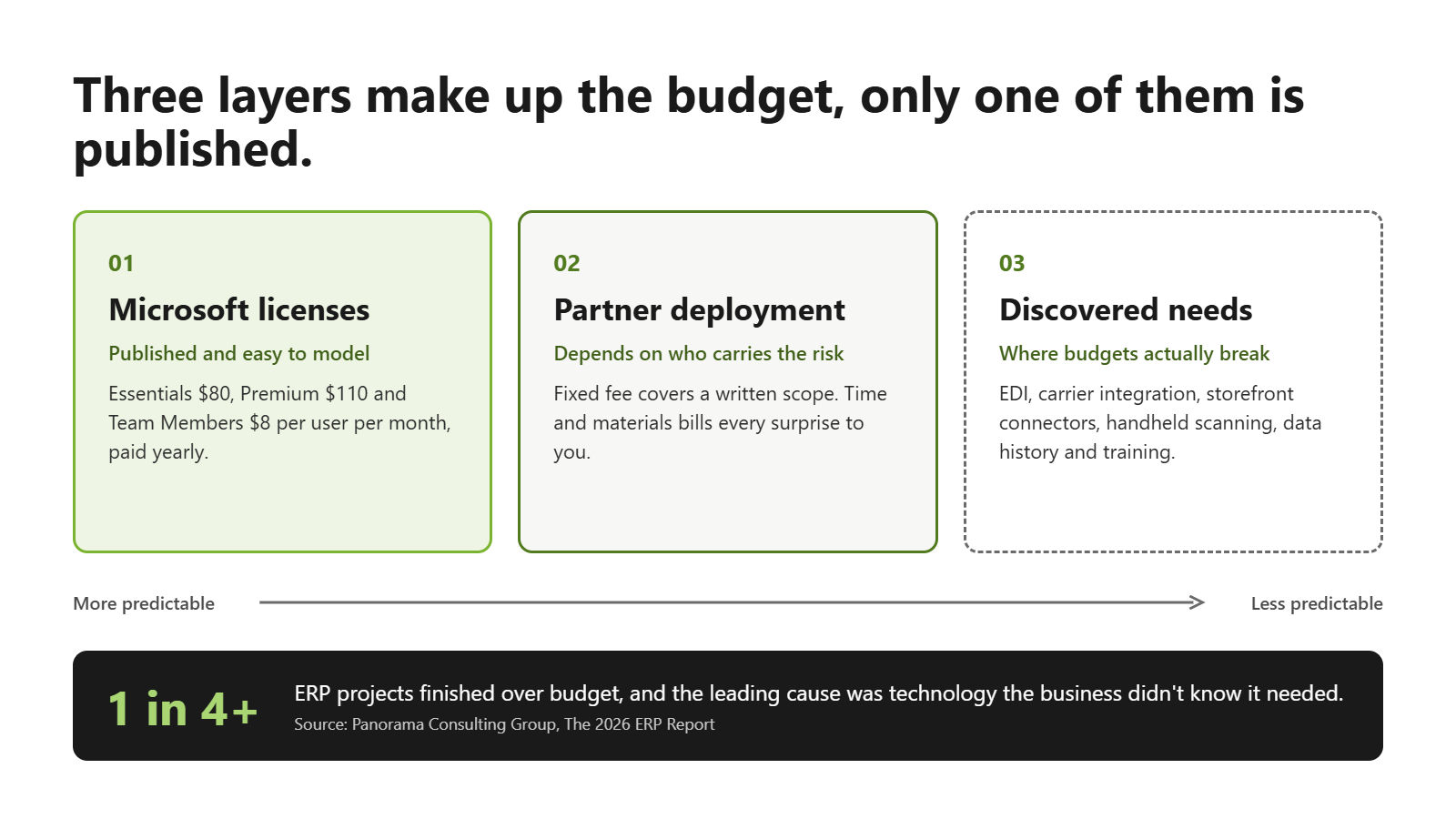
More than a quarter of the organizations in Panorama Consulting’s 2026 ERP Report finished over their implementation budget, and the leading cause wasn’t a runaway consultant or a botched data load. It was technology the business only discovered it needed once the project was underway. For a distributor pricing a move to Microsoft Dynamics 365 Business Central, that finding is the most useful lens for reading a quote, because the number that ends up hurting is rarely the one printed on the proposal.
A realistic Business Central implementation cost has three layers. There is what Microsoft charges for the software, which is published and easy to model. There is what a partner charges to deploy it, which swings widely depending on how that partner prices risk. Then there is what the business learns it needs when real orders, real inventory and real warehouse habits meet the new system, and that third layer is where most budgets break.
In this article
- What Microsoft charges for Business Central licenses
- Why partner quotes for the same project look so different
- What a fixed-price Business Central bundle should spell out
- Where Business Central budgets actually break
- What Business Central costs after year one
- How to compare Business Central quotes side by side
- Business Central implementation cost: common questions
What Microsoft charges for Business Central licenses
Microsoft’s licensing is the easy part. Microsoft lists Business Central pricing at $80 per user per month for Essentials and $110 for Premium, both paid yearly, with Team Members licenses at $8 per user per month. Essentials covers what a distributor runs on every day: financials, sales and purchase orders, inventory, warehouse management and reporting. Premium adds manufacturing and service management, which matters for a distributor that does light assembly or runs a repair counter but is overhead for one that only buys, stores and ships.
Team Members licenses are where distributors save money without giving anything up. A branch manager who approves purchase orders, or a warehouse lead who checks stock and reviews documents, rarely needs a full seat. At list price, five Essentials users come to $4,800 a year before anything else is added, which is a useful floor to keep in mind when the first quote arrives.
Why partner quotes for the same project look so different
Two partners can scope the same distributor and come back with numbers that seem unrelated, and the difference is usually less about competence than about who carries the risk. A time-and-materials quote estimates hours, multiplies them by a rate and bills what is actually spent, so every surprise in discovery, every extra report and every round of data cleanup lands on the client’s invoice. A fixed-fee quote prices a defined scope up front and leaves the partner to absorb overruns inside it, which gives the partner a strong reason to standardize the deployment and keep it moving.
Fixed pricing has its own expectation gap, and it’s worth being direct about this. Buyers hear “fixed price” and assume everything they will eventually want is included. What’s included is the scope written in the proposal. Anything outside it, from a new EDI trading partner to a custom pick ticket, becomes a change order, so the value of a fixed price depends entirely on how specifically that scope is written.
What a fixed-price Business Central bundle should spell out
A well-written fixed-price offer reads less like an estimate and more like a bill of materials. ACE Micro, for example, publishes three Business Central bundles starting at $35,295, $47,345 and $68,845, each based on five users and each including the first year of subscriptions, deployment, standard data migration and unlimited support. The Finance bundle covers general ledger, payables, receivables, cash management and contact management. Supply Chain adds inventory, sales and purchase orders, sales tax and a sales document template, while Distribution layers on bin management, warehouse documents, transfer orders, prepayments, cash flow forecasting and advanced financial reporting.
The pricing detail that matters most is how the number grows. The ACE Micro FAQ adds about $900 per user per year in subscriptions and $600 per user per year in support for each user beyond five, with optional extensions priced separately through the ACE Micro marketplace. Whichever partner you talk to, ask for the same three things in writing: the modules in scope, the per-user cost above the base, and the price of anything listed as an add-on.
Where Business Central budgets actually break
Panorama’s finding about unplanned technology maps closely onto distribution projects. The core system goes in on budget, and then the edges show up. A distributor with a Shopify storefront assumes it needs a paid connector and budgets for middleware it may not need at all, which is the case we made in our look at the hidden cost of Shopify middleware. Others learn mid-project that a major customer requires EDI, that parcel carrier integration was never in scope, or that the warehouse team wants handheld scanning on day one rather than in phase two.
Data migration is the other quiet budget line. Moving open balances, customers, vendors and items is standard work; moving ten years of transaction history in a form people can actually report on is not, and that decision changes the price. Training belongs on the same list. A partner can teach your power users the system, but someone inside the business still has to train the person receiving freight at 6 a.m.
None of these costs are hidden if someone raises them in the first scoping meeting. So who on your team owns the job of raising them before the contract is signed?
What Business Central costs after year one
Bundled pricing that includes the first year of subscriptions makes year one look clean, which is exactly why year two deserves a line in the budget before anything is signed. From the second year, licenses renew at whatever Microsoft’s list price is at that point, support renews at the partner’s rate, and any extensions added along the way carry their own subscriptions. For the five-user example above, the right year-two planning figure is the license cost plus the support plan, not zero.
Some distributors would rather spread the first-year outlay than pay it up front, and partner financing such as ACE Micro’s lease option through Trifin Capital turns the project into a predictable monthly payment. That trades a smaller initial cash hit for the cost of financing, which makes it a finance decision as much as a technology one.
How to compare Business Central quotes side by side
The cleanest way to compare quotes is to rebuild each one into the same shape: licenses for year one and year two, the deployment fee, data migration scope, training approach, support terms, and a list of everything explicitly excluded. Proposals that look far apart can converge once the exclusions are priced in, and occasionally the cheaper one turns out to be the more expensive project.
For distributors still on QuickBooks or Dynamics GP, the scoping conversation is also where fit gets tested. A partner that asks how many warehouses you run, how you price customer contracts and which reports leave the system in Excel is building a scope you can hold them to. If you want to see that applied to your own operation, Business Central for distribution walks through the operational side, and a short scoping conversation will tell you which bundle fits before any commitment is made.
Business Central implementation cost: common questions
How much does a Business Central implementation cost for a small distributor?
For a five-user distributor, fixed-price bundles that include first-year licenses, deployment, data migration and support start in the mid-$30,000 range for finance-only deployments and rise toward $70,000 for full distribution functionality, based on ACE Micro’s published pricing. Time-and-materials projects vary more widely because the final cost depends on the hours used.
How much is a Business Central license per user?
Microsoft lists Business Central Essentials at $80 per user per month and Premium at $110 per user per month, paid yearly. Team Members licenses for light users are $8 per user per month.
Is a fixed-price ERP implementation really fixed?
It is fixed for the scope written in the proposal. Integrations, custom reports and extra data history outside that scope become change orders, so a detailed scope is what makes a fixed price meaningful.
What does Business Central cost after the first year?
License renewals at Microsoft’s current list price, the partner’s support plan, and subscriptions for any extensions added during or after the project.